 LLMFreeAPI
Maintaining Context in Long Coding Sessions

When working on substantial software projects, the primary bottleneck is often not the model's intelligence, but its ability to retain context. As codebases grow, models hit their token limits, leading to 'context loss' where the AI forgets earlier decisions, variable names, or architectural patterns. This results in inconsistent refactoring, broken imports, and redundant code generation that requires manual correction.
To combat this, developers must move beyond simple copy-pasting into structured context management. This involves using tools that can directly access file systems, managing context windows efficiently, and selecting models with sufficient parameter counts to handle complex reasoning. The goal is to create a seamless workflow where the AI acts as a true extension of your development environment rather than a disconnected chatbot.
This guide outlines practical strategies for maintaining context integrity. We will explore how to use local models for direct file access, leverage free APIs for scalable processing, and implement best practices for prompt engineering. By combining these techniques, you can ensure your coding agent remains accurate and reliable, even as your project scales in complexity and size.
Frequently asked questions
What is context loss in LLMs?
Context loss occurs when an LLM exceeds its token limit and 'forgets' earlier parts of the conversation or document. In coding, this means the model may lose track of variable definitions, class structures, or specific requirements established earlier in the session, leading to inconsistent or erroneous code generation.
How does a local model differ from a cloud API for context?
Local models run on your hardware, allowing direct access to your file system without uploading entire codebases. This reduces latency and keeps data private. Cloud APIs often require you to manually paste code or use specific endpoints, which can be cumbersome for large projects and may introduce privacy concerns.
Which is better for long coding sessions: local or cloud?
Local models offer better privacy and direct file access, making them ideal for sensitive projects. Cloud APIs provide access to larger models with better reasoning capabilities. For long sessions, local models are preferred for context retention, while cloud APIs are better for complex reasoning tasks that exceed local hardware limits.
What is the role of context windows in coding?
Context windows define the amount of text an LLM can process at once. Larger windows allow the model to 'remember' more code, leading to better consistency. However, larger windows also increase computational load and cost. Balancing window size with model performance is key to efficient coding assistance.
How can I reduce context loss in my workflow?
You can reduce context loss by using tools that summarize previous interactions, maintaining a structured prompt template, and regularly refreshing the context with key code snippets. Additionally, using models with larger context windows and optimizing your code for brevity can help maintain accuracy over long sessions.
What is the difference between uncensored and abliterated models?
Uncensored models are designed to minimize refusals, allowing for more creative or unconventional code generation. Abliterated models are fine-tuned to remove specific safety filters while retaining general capabilities. For coding, uncensored models may offer more flexibility, but both can be effective depending on your project's needs.
How do I choose the right model for my hardware?
Consider your GPU VRAM, CPU speed, and RAM. Smaller models (e.g., 7B parameters) run faster on modest hardware, while larger models (e.g., 35B+) require more resources but offer better reasoning. Use tools like llama.cpp to optimize model performance and ensure smooth operation on your specific setup.
What are the benefits of using a free API for coding?
Free APIs provide access to powerful models without cost, making them ideal for prototyping and small projects. They often support standard OpenAI-compatible endpoints, allowing easy integration with existing tools. However, they may have rate limits and lack the privacy of local models, so they are best used for non-sensitive code.
Step by step
- Set Up Local Model — Install LM Studio and load a local model. Point it to your project folder to enable direct file access.
- Configure Context Window — Adjust the context window size to balance performance and context retention. Use summarization if needed.
- Integrate API — Integrate LLMFreeAPI for scalable processing. Use the OpenAI-compatible endpoint for easy integration.
- Test Workflow — Test your workflow for context loss and refusal accuracy. Refine prompts based on results.
- Monitor Performance — Monitor token usage and rate limits. Adjust your strategy to avoid hitting limits.
Understanding Context Loss in Coding Agents
Context loss is the primary challenge in using LLMs for long coding sessions. As the conversation or document length increases, the model's ability to retain information from the beginning of the session diminishes. This is particularly problematic in coding, where earlier decisions about architecture, variable names, and logic flows are critical for consistency.
To mitigate this, developers must adopt strategies that preserve context. This includes using tools that can directly access file systems, managing context windows efficiently, and selecting models with sufficient parameter counts. By doing so, you can ensure that your coding agent remains accurate and reliable, even as your project scales in complexity.
The Impact of Token Limits
Token limits define the maximum amount of text an LLM can process at once. When these limits are exceeded, the model may 'forget' earlier parts of the conversation, leading to inconsistent code generation. Understanding your model's token limit is crucial for managing context effectively.
Why Context Matters in Code
In coding, context includes variable definitions, class structures, and architectural patterns. Losing this context can result in broken imports, redundant code, and logical errors. Maintaining context ensures that the AI generates code that is consistent with the rest of your project.
- Monitor token usage to avoid exceeding limits.
- Use summarization techniques to preserve key information.
- Select models with larger context windows for complex projects.
Leveraging Local Models for Direct File Access
Local models offer a significant advantage in maintaining context by allowing direct access to your file system. Tools like LM Studio enable you to point the model directly at your project folder, eliminating the need to manually copy and paste code into the chat. This reduces latency and keeps your data private.
By using local models, you can ensure that the AI has access to the entire codebase, rather than just the snippets you manually provide. This leads to more accurate and consistent code generation, as the model can reference earlier decisions and structures without losing context.
Setting Up LM Studio for Code Access
LM Studio allows you to load local models and configure them to access your file system. By pointing the model to your project folder, you enable it to read and write code directly, streamlining the development process and reducing the risk of context loss.
Benefits of Local Processing
Local processing offers several benefits, including faster response times, greater privacy, and the ability to handle large codebases without relying on cloud services. This makes it an ideal choice for developers who prioritize control and accuracy in their coding workflows.
- Use LM Studio to load local models.
- Point the model to your project folder for direct access.
- Monitor performance to ensure smooth operation.
Using Free APIs for Scalable Processing
For projects that require more computational power than local hardware can provide, free APIs offer a scalable solution. Services like LLMFreeAPI provide access to powerful models without the need for API keys or accounts, making them ideal for prototyping and small projects.
These APIs often support standard OpenAI-compatible endpoints, allowing easy integration with existing tools. However, they may have rate limits and lack the privacy of local models, so they are best used for non-sensitive code. For more information on choosing between local and cloud models, see [Best Uncensored API](/best-uncensored-api).
Integrating LLMFreeAPI into Your Workflow
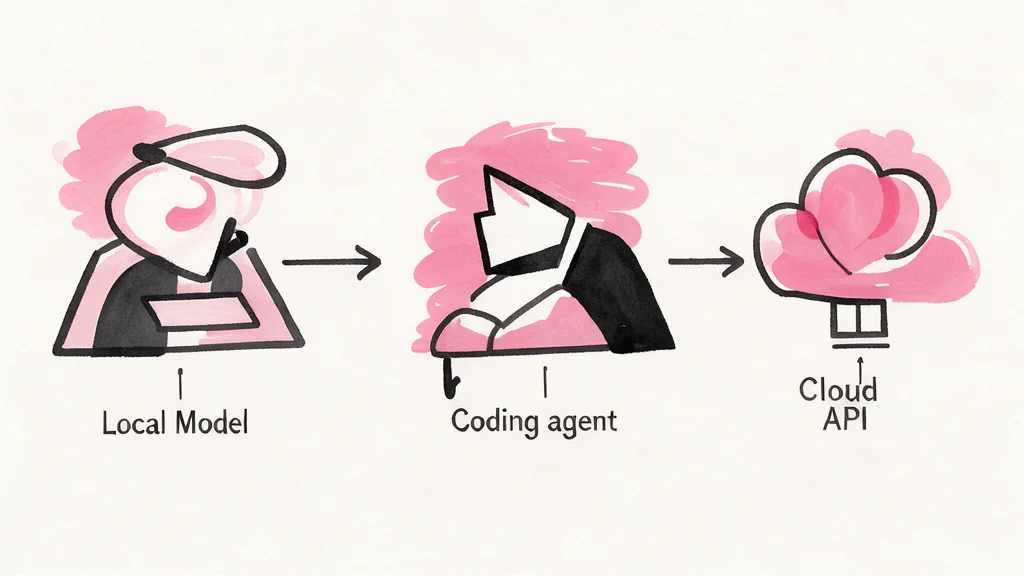
LLMFreeAPI provides a free, keyless API that is compatible with the OpenAI SDK. This allows you to easily integrate it into your coding agents without the need for complex setup. You can use it to handle complex reasoning tasks that exceed your local hardware limits.
Managing Rate Limits and Quotas
Free APIs often have rate limits, such as 1 request per second and 10,000 requests per day. Understanding these limits is crucial for maintaining a smooth workflow. You can monitor your usage and adjust your strategy to avoid hitting these limits.
- Use LLMFreeAPI for scalable processing.
- Monitor rate limits to avoid disruptions.
- Integrate with existing tools using OpenAI-compatible endpoints.
Best Practices for Prompt Engineering
Effective prompt engineering is essential for maintaining context in long coding sessions. By structuring your prompts clearly and providing relevant context, you can help the model understand your intentions and generate more accurate code.
This includes using clear instructions, providing examples, and specifying the desired output format. By doing so, you reduce the risk of ambiguity and ensure that the AI generates code that aligns with your project's requirements.
Structuring Your Prompts
Structure your prompts to include clear instructions, relevant context, and desired output format. This helps the model understand your intentions and generate code that is consistent with your project's requirements.
Using Examples to Guide the Model
Providing examples of desired code can help the model understand the style and structure you are aiming for. This reduces the risk of generating code that is inconsistent with your project's conventions.
- Use clear and concise instructions.
- Provide relevant context and examples.
- Specify the desired output format.

Managing Context Windows Efficiently
Context windows define the amount of text an LLM can process at once. Managing these windows efficiently is crucial for maintaining context in long coding sessions. This involves balancing the size of the context window with the model's performance.
Larger windows allow the model to 'remember' more code, leading to better consistency. However, they also increase computational load and cost. Understanding how to manage these windows is key to efficient coding assistance.
Optimizing Context Window Size
Optimize your context window size by balancing the need for context with computational efficiency. Use tools that can summarize previous interactions to preserve key information without exceeding token limits.
Refreshing Context Regularly
Regularly refresh your context with key code snippets to ensure the model has the most relevant information. This helps maintain accuracy and consistency over long sessions.
- Balance context window size with performance.
- Use summarization to preserve key information.
- Refresh context with key code snippets regularly.
Selecting the Right Model for Your Needs
Choosing the right model is crucial for maintaining context in long coding sessions. Consider factors such as parameter count, context window size, and reasoning capabilities.
Smaller models (e.g., 7B parameters) run faster on modest hardware, while larger models (e.g., 35B+) offer better reasoning but require more resources. For more insights on model selection, see [How to Choose the Right Model](/how-to-choose-model).
Evaluating Model Capabilities
Evaluate models based on their ability to handle complex reasoning and maintain context. Larger models generally offer better performance but require more computational resources.
Considering Hardware Constraints
Consider your hardware constraints when selecting a model. Smaller models are better for limited hardware, while larger models require more powerful setups.
- Evaluate model capabilities for reasoning and context.
- Consider hardware constraints when selecting a model.
- Balance performance with resource usage.

Integrating with Coding Agents
Integrating LLMs with coding agents can significantly enhance your development workflow. By using tools that support direct file access and context management, you can ensure that your AI acts as a true extension of your development environment.
For more information on building agents, see [How to Build AI Agents](/how-to-build-agents). This includes using tools like n8n and free APIs to create automated workflows that leverage the power of LLMs.
Using n8n for Automation
n8n is a powerful tool for automating workflows and integrating LLMs into your development process. It supports direct file access and context management, making it an ideal choice for building coding agents.
Leveraging Free APIs for Scalability
Free APIs like LLMFreeAPI provide scalable processing power for your coding agents. By integrating these APIs, you can handle complex tasks that exceed your local hardware limits.
- Use n8n for automation and integration.
- Leverage free APIs for scalable processing.
- Ensure direct file access for context management.
Testing and Refining Your Workflow
Testing your workflow is essential for ensuring that your coding agent maintains context accurately. This includes testing for refusals, evaluating model performance, and refining your prompts.
For more information on testing refusals, see [How to Test Refusals](/how-to-test-refusals). By regularly testing and refining your workflow, you can ensure that your coding agent remains accurate and reliable over long sessions.
Conducting Refusal Tests
Test your model's ability to handle refusals, especially for sensitive or unconventional code. This ensures that the AI generates code that aligns with your project's requirements without unnecessary restrictions.
Refining Prompts for Accuracy
Continuously refine your prompts based on test results to improve accuracy. Use feedback to adjust your strategies and ensure that your coding agent remains effective over time.
- Conduct refusal tests to ensure accuracy.
- Refine prompts based on test results.
- Continuously improve your workflow.
Test the keyless API right now on the home page to see how unrestricted AI handles your prompts without any setup.
Home →